Beginner · 12 min
Aniimo Menu Guide: Dailies, Weekly Caps and the Level Cap
Two pages of event screens, five quest tabs and an Elite Training board that quietly decides your level cap. AniimoSync opened every one of them on camera, and we matched the labels, the point values and the whole promotion ladder against the game’s data files. If you are level capped and do not know why, the answer is in one of these menus.

Video by
AniimoSync
Every menu walkthrough, warning and screenshot on this page by AniimoSync, published here with permission
Aniimo’s daily menus reset at 04:00 (UTC+8) and its weekly caps reset on Monday at the same hour. Almost nothing on the Events tab is urgent, and the one menu that really can stop your account is Elite Training, because its Core Courses are what raise your level cap. That is the short version of a screen count that puts eight event panels, a second page of seven more and five quest tabs in front of a player who has been in the game for an hour.
This page is a map rather than a tour. It says what each menu does, what resets on what clock, what is capped and what is not, and which two things are worth doing before you log off. Where an event has dates, they are on our events calendar and linked rather than repeated here, because dates age and menus do not.
Two sources, named in every section. The walkthrough is AniimoSync’s, filmed in the live game on 18 September 2026, and every timestamp points at their footage. The labels, point values, weekly caps and the promotion ladder come from the game’s data files, build 1.0.0.7. Where only one of the two has a fact, the page says which. Checked 19 September 2026.
Updated 29 October 2026: Trailblazer II and III now take the level cap to 70; see How to raise your level cap.
What resets daily, weekly and seasonally in Aniimo
Aniimo runs on one daily clock at 04:00 (UTC+8) and one weekly clock on Monday at 04:00. Everything else either never resets or expires on a published calendar date. The daily hour is not midnight and it is not your local time, which is the single most common reason a check-in looks like it did not count.
AniimoSync says the same thing at 4:29 about the Sparkelf screen: the renewal happens at a specific time, and that time is game time rather than yours. The client is more precise. Its Mysterious Vendor rules read, word for word, that the vendor restocks daily at 04:00 AM (UTC+8), and its weekly claim rules read that the limit resets every Monday at 04:00. The official Welcome to Idyll notice uses the same hour for login check-ins.
This is the whole reset picture on one screen.
| What | Where it lives | When it resets |
|---|---|---|
| Login check-ins (Set Out, Pathfinder! and Journey Handbook) | Events tab | Daily, 04:00 UTC+8 |
| Daily Activity quests and their point score | Institute Guide | Daily |
| Sparkelf codex jobs and friend Sparks | Events tab | Daily, 04:00 |
| Mysterious Vendor stock | Astra, near Horizon Square | Daily, 04:00 UTC+8 |
| Stamp Rush, capped at 1,000 Season Stamps | Institute Guide | Weekly, Monday 04:00 |
| Stamp Shop weekly tab | Stamp Shop | Weekly, Monday 04:00 |
| Elite Training Core Courses | Elite Training | Never. One run per chapter |
| Legendary Journey Irisalis Petals | Events tab | Never. Unspent petals are kept permanently |
One regional footnote, because the client carries more than one version of that sentence. The same vendor rule exists in UTC+0 and UTC-4 wordings as well as the UTC+8 one, so the hour is 04:00 on your server’s clock rather than on Chinese time specifically. Check the countdown on the screen itself before you plan around it.
Where every Aniimo menu actually lives
The Events tab has two pages, not one, and the two small icons in its bottom left corner are how you switch between them. The first page is the events with countdowns, and the second page is the progression hub that launches every screen people go looking for.
AniimoSync opens on the problem at 0:08: you are bombarded with buttons, and most of them lead to other buttons. The structure underneath is smaller than it looks.
| Where | What it holds | What it is for |
|---|---|---|
| Events, page one, the calendar icon | Set Out, Pathfinder!, Prismana Pact, Journey Handbook, Set Off Together!, Idyll Ecology Field Notes, Who’s That Aniimo?, Hatch Haste and the Sparkelf collab | Anything with an end date |
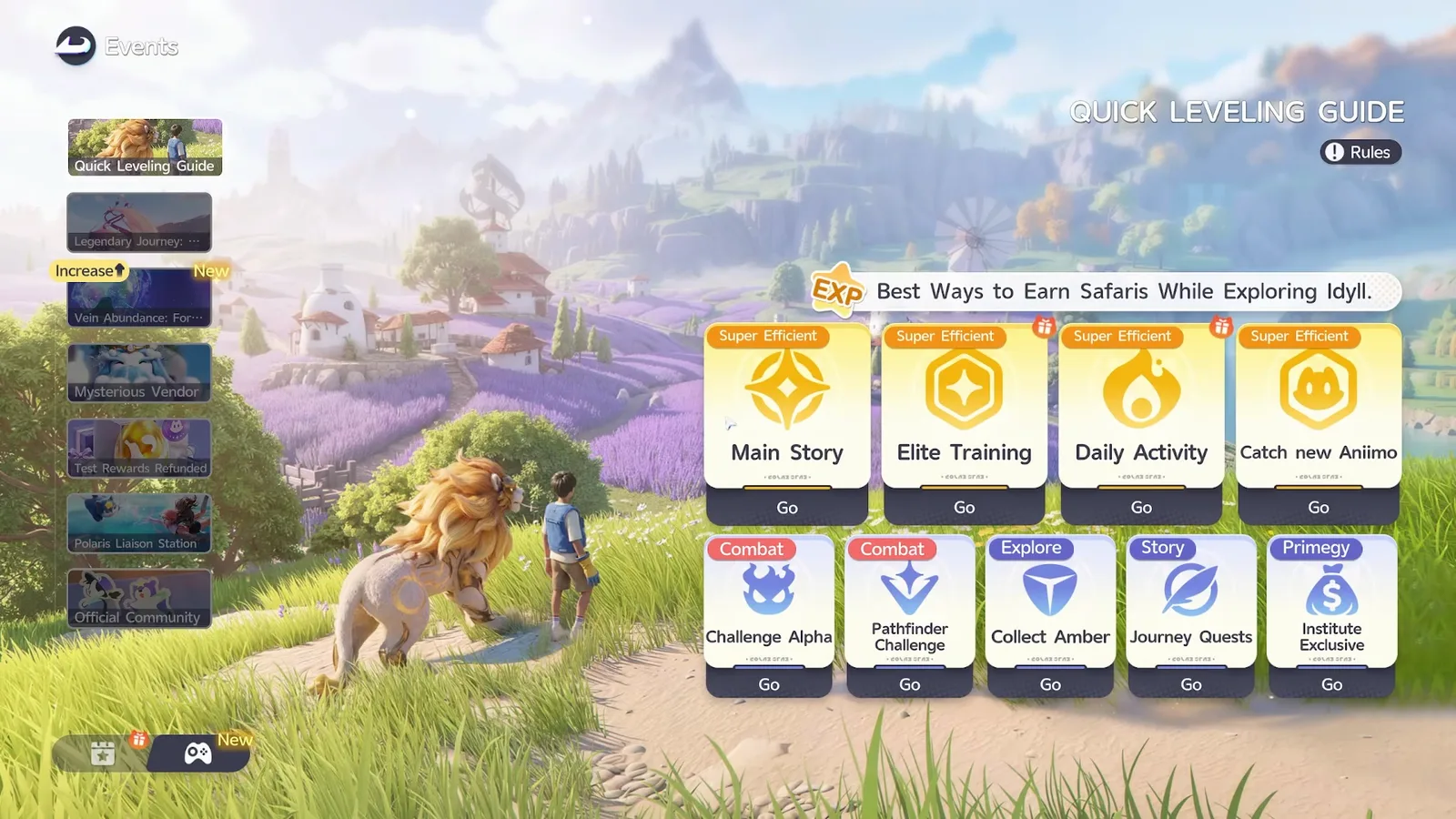
| Events, page two, the controller icon | Quick Leveling Guide, Legendary Journey, Vein Abundance, Mysterious Vendor, Test Rewards Refunded, Polaris Liaison Station, Official Community | Progression, the season, and account admin |
| Quick Leveling Guide | Go buttons into Main Story, Elite Training, Daily Activity, Catch new Aniimo, Challenge Alpha, Pathfinder Challenge, Collect Amber, Journey Quests and Institute Exclusive | The launcher for everything capped |
| Institute Guide | Three tabs down its left edge: Daily Activity, Aniimo Challenge, Stamp Rush | Everything on a daily or weekly cap |
| The Log | Lore, Quests, Journey, World Rumors, Journey Journal | Anything with a map pin |
AniimoSync flags those two icons at 4:58 as the batch that is hardest to navigate, and the distinction they draw is the useful one: some of these screens are tied to your Pathfinder and the story, and some are rotational events outside it. If you are trying to make something stronger, you want the second page.
The Events tab, screen by screen
Page one of the Events tab held eight panels at launch, and only two of them are permanently open to new players: Set Out, Pathfinder! and the Prismana Pact. Everything else on that list carries a countdown, and the countdown is printed at the top of each panel rather than on the tab.
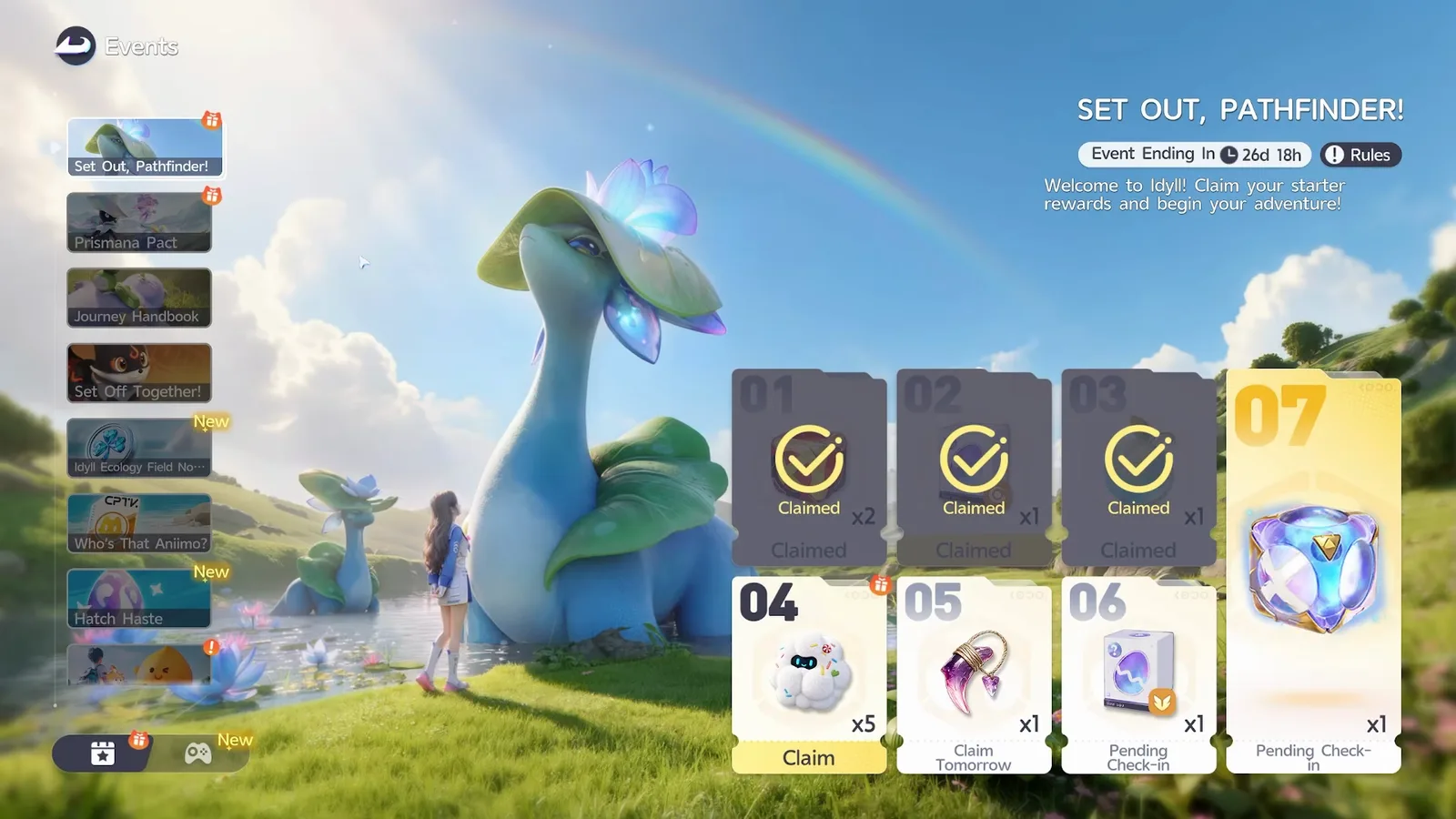
The two that wait for you are worth separating out, because nothing about them is urgent. Set Out, Pathfinder! is a seven check-in track, and the official notice is explicit that rewards are based on your total check-ins rather than a streak, so a missed day costs a day and not the ladder. Their panel read Event Ending In 26d 18h on the screenshot below, a live timer that ticks down as you watch, while the official calendar files the event as always open for new players, which is the client telling you the window is tied to your account rather than to the season. The track itself is seven numbered cards, and card 07 is the gold one everyone is here for.
The Prismana Pact panel is the other one, and it has no timer at all. Behind it sits the Prismana Promise, the free Prismana pick, and the client is specific about its gate: once you reach Lv. 40 and promote your title, the Aniimo you chose can travel alongside you, and before you permanently claim it you can swap to a different companion at any time. Our guide to which free Prismana to choose covers the fourteen on the board.
The third check-in is the one that does expire. Journey Handbook asks for 30 cumulative check-in days, and the window is generous enough that missing one costs a day rather than the ladder. AniimoSync’s panel at 1:42 read Total Logins: 3 day(s) with Event Ending In 40d 17h beside it, which is well over a week of slack on a 30 day ask. The reward cards below run 01 Day, 05 Day, 10 Day, 15 Day and onward, and the data files finish the ladder at 20, 25 and 30. That grace period is the whole point of a cumulative counter.

One panel on that list is not a free event and is easy to read as one. Set Off Together unlocks with your first top up, and AniimoSync spells out at 2:05 that the monthly pass and the Companion Handbook both count towards it. It hands you rewards on top of a purchase you were already making, so it is worth knowing about and worth nobody buying anything for.
Rotating events, and how to read the timer
Rotating event panels refresh on their own schedules, daily, weekly or seasonally, and the countdown at the top of each panel is the only reliable guide to which one you are looking at. AniimoSync’s advice at 2:43 is the right habit: read the timer first, then read the reward at the bottom, then decide whether the panel is worth your evening.
Their launch-day board carried a rotating capture event with 17 hours and 56 minutes left, a Who’s That Aniimo? panel, and a brand new one called Hatch Haste, whose panel reads From Friday to Sunday, Aniimo egg hatching time is halved above a running Total Time Saved counter and a Hatch button. That last one is a good example of why names are worth checking twice: Hatch Haste is the name the client prints and the name on screen, while the official calendar files the same Friday to Sunday slot under Eggceleration. Our egg hatching guide explains what a halved timer is actually worth.

The same lesson applies to the regional event they open at 11:50. Vein Abundance floods one region with a species you can capture over and over to fill a gauge, and at launch that region was the Forest of Falling Stars. AniimoSync is emphatic that it recurs, and they are right: the calendar carries six back to back segments through late October. Nothing on that row is a one-off you can miss.
The collab panel is the one with a genuine daily rhythm. The Sparkelf event pays Sparks for three codex jobs a day and for renewing a Spark with friends, up to 30 a day, and both halves reset on the 04:00 clock. Our Sparkelf guide has the full 500 Spark ladder, and the short version is that ten full days out of the event’s run is enough.
The Log and its five tabs
The quest menu is called the Log, and it carries five tabs: Lore for the story, Quests for side quests, Journey for sub quests, World Rumors behind the light bulb icon, and the Journey Journal behind the book icon. Selecting an entry and pressing its Go or Track button pins it to your map, which is how most of the game’s content is meant to be found.
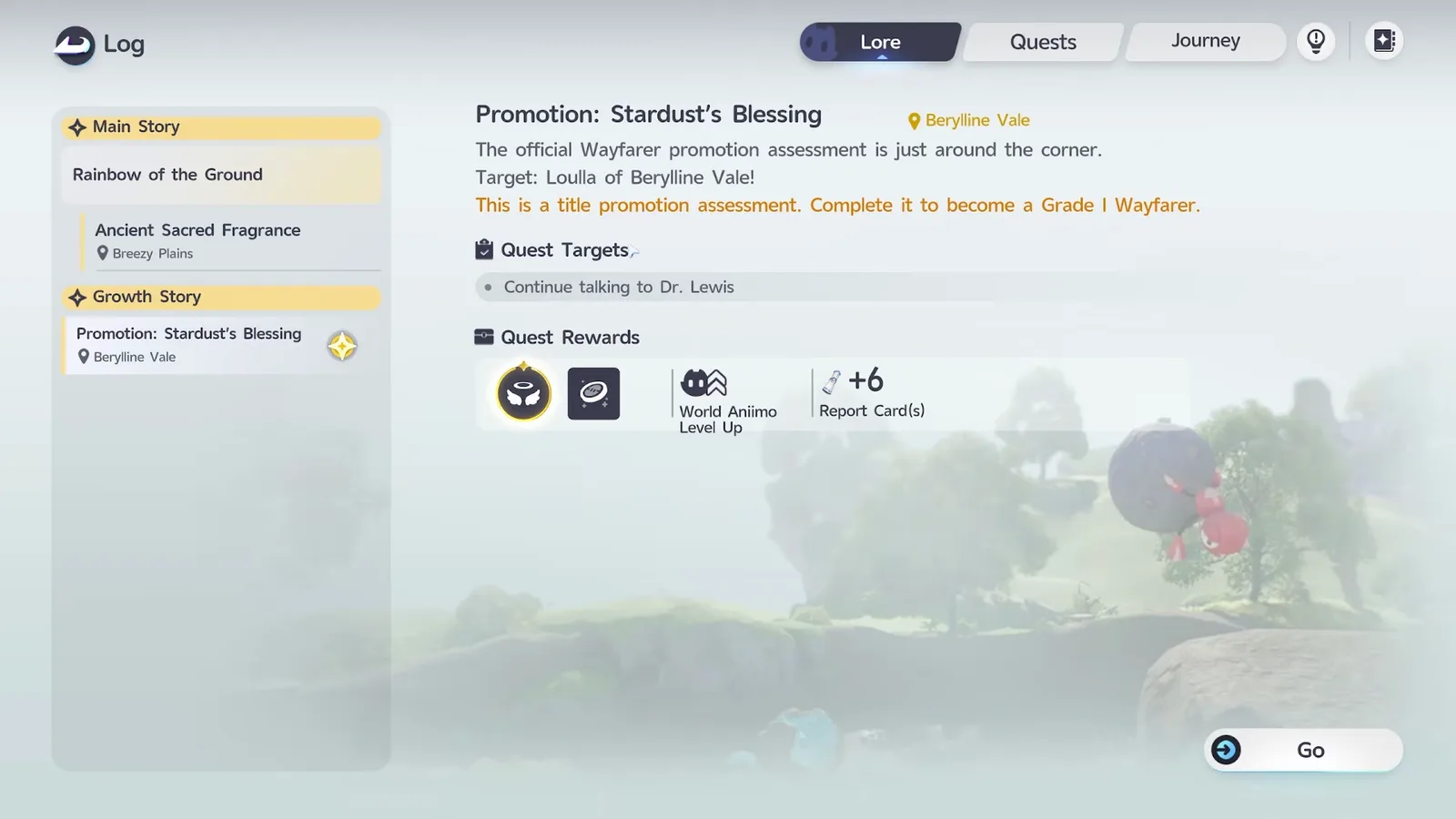
The Lore tab is the one worth knowing the shape of, because it splits into two groups of its own. Main Story holds the chapter you are on. Growth Story holds your title promotion assessments, which is the quest line the level cap section below turns on.
AniimoSync’s one warning here is worth quoting because it costs people time rather than rewards. At 6:17 they say to read what is going on, because a quest sometimes needs you to do something in the area before it will trigger. A tracked marker is not always a trigger.
The last two tabs are not quests at all. World Rumors are chain quests that start when you visit a place and do a couple of things there, and the Journey Journal is reference material: lore entries, explanations and, on its final tab, a catalogue of every item you have found. Some entries are still locked at launch. Neither tab rewards anything for reading it, which is exactly why it is the tab to open when a mechanic has confused you.
The screen that reaches the Quest Log fastest is the Quick Leveling Guide, the first panel on page two of the Events tab. Its header reads Best Ways to Earn Safaris While Exploring Idyll, and its cards are tagged by what they are good for: Main Story, Elite Training, Daily Activity and Catch new Aniimo are marked Super Efficient, with Challenge Alpha and Pathfinder Challenge under Combat, Collect Amber under Explore, Journey Quests under Story and Institute Exclusive under Primegy. Every card has a Go button that opens the screen behind it, which makes this the sensible default when you have twenty minutes and no plan.
Elite Training: Core Courses, four quests and four paths
Elite Training is the menu that decides your level cap, and the part that does it is the top row, Core Courses. Each chapter asks for four required quests, and the bar has to read four out of four before the game will promote you. The other four tabs are optional and pay a different track entirely.
AniimoSync is candid at 7:23 that this screen confused them too, and the confusion has a specific shape: the counter can read more than four. One of their completed chapters showed five out of four. That is not a bug. Each chapter lists five required quests and asks you to finish any four of them, which the data files store the same way: five task ids per chapter against a required count of four. The client’s requirement text reads Complete 4 required quests in Chapter 1 and the same for Chapters 2 to 6. Chapter 7’s text reads three, although its chapter row still stores four, so treat the last one as four until a screenshot says otherwise.
Chapter 4 in their footage is a fair sample of what those five ask for: earn the Bronze Collection Badge in Berylline Vale, go to Echoback Landing and search for salt, complete five Pathfinder Challenges, perform Capability Awakening five times, and spend 200,000 Credits. They are ordinary play with a box to tick, not a wall.
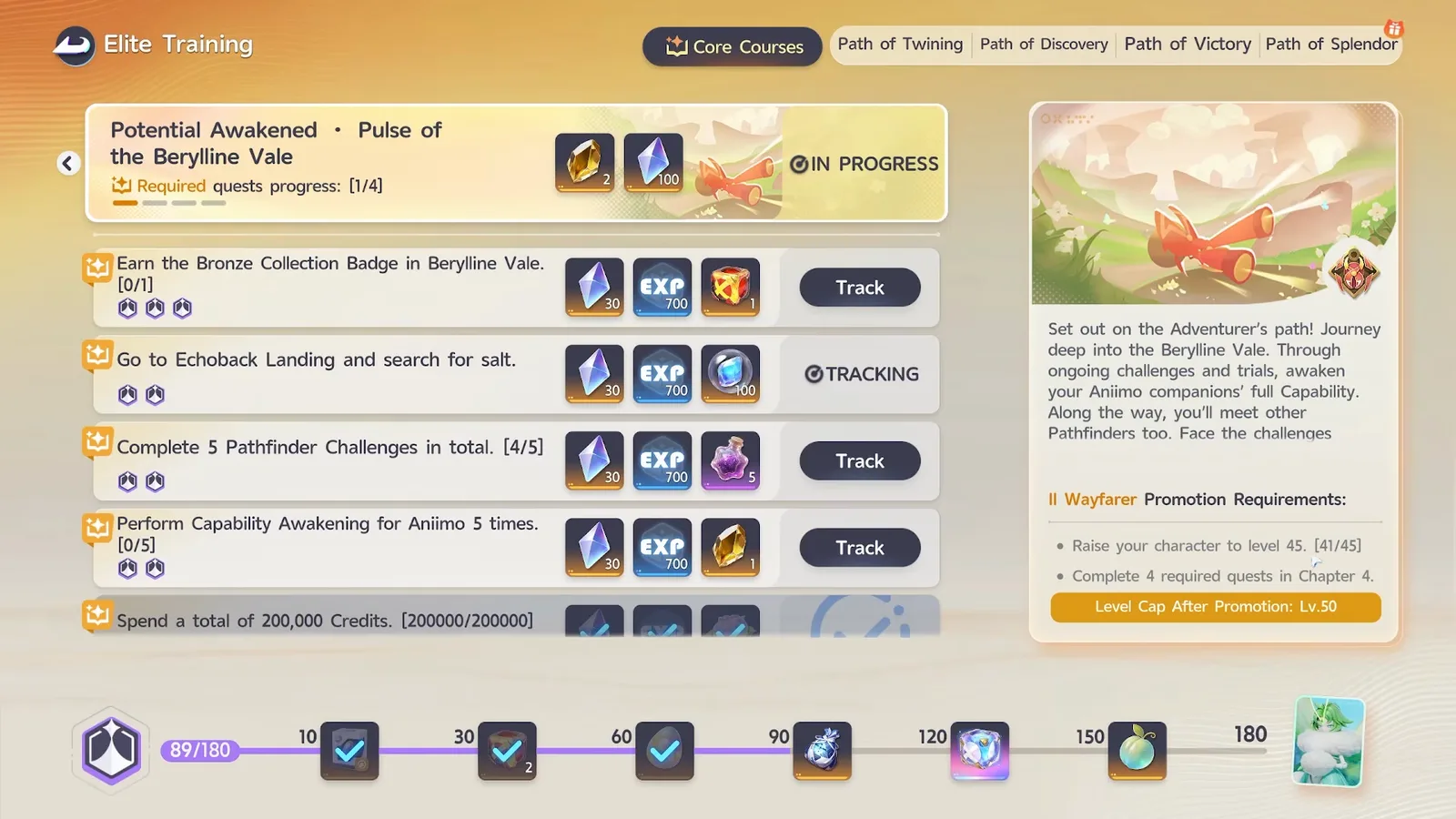
The four tabs along the top right are the optional half, and the client labels them so: Core Courses are required, while Path of Twining, Path of Discovery, Path of Victory and Path of Splendor each open under the heading Elective Courses. Path of Twining’s subtitle is simply Explore the open world for more quests, and its list is the kind of thing you would do anyway: earn Collection Badges in eight areas of Breezy Plains, obtain one Umbral Aniimo, own one Aniimo with Resonance at Tier 4, raise a Capability Awakening stat to 10, collect three Sparkling Aniimo. All four paths can be tracked or claimed as you complete them, and all four feed the reward track running along the bottom of the screen rather than your promotion. That track is a points bar with stops at 10, 30, 60, 90, 120, 150 and 180, and the card sitting at the end of it is Somniwing. AniimoSync says at 9:02 that this is the only way to get one.
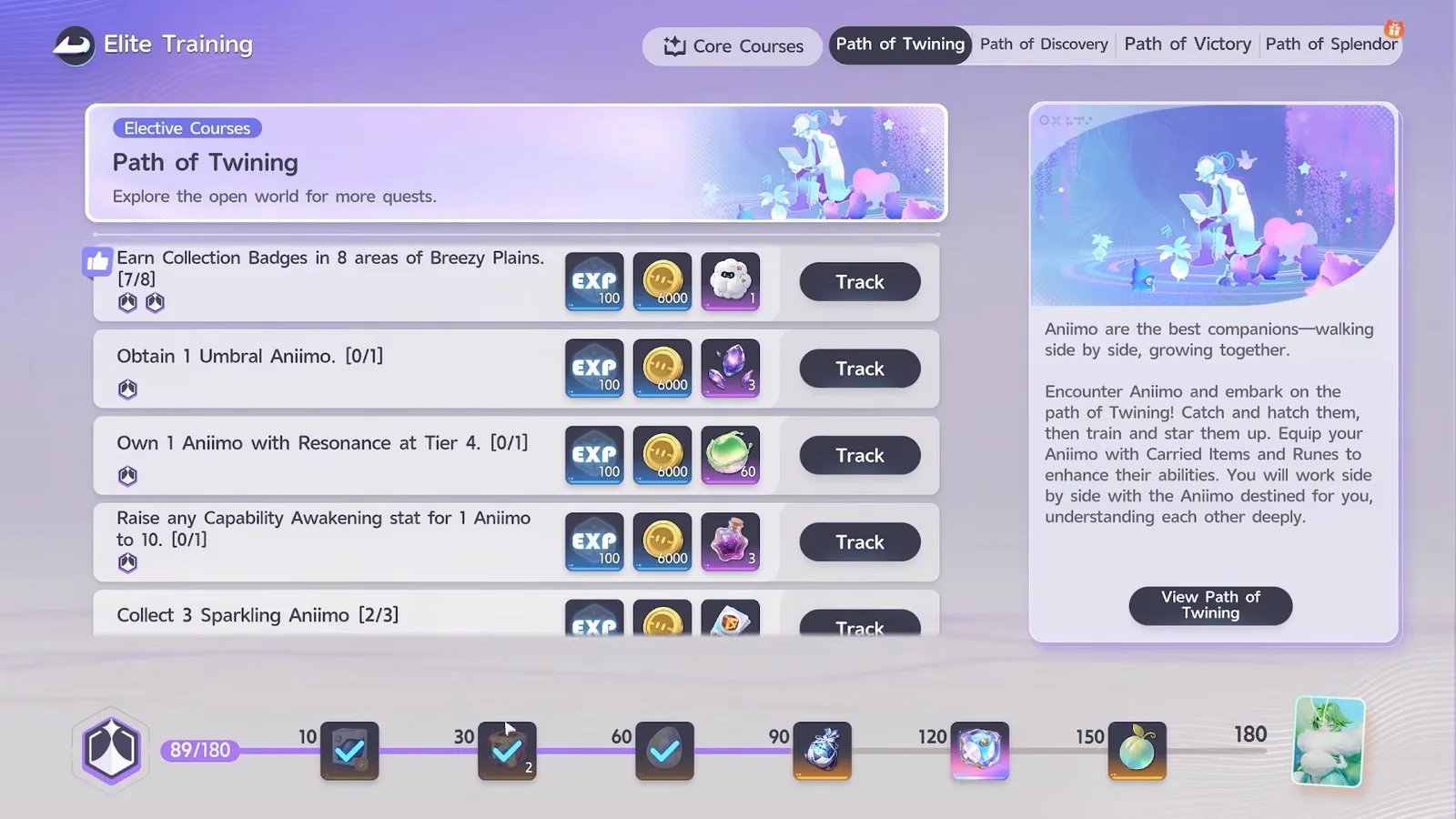
So the division of labour is clean, and it is the sentence to take away from the whole menu. Core Courses raise your cap. The four paths fill the bottom track. If you are stuck, only the top row can unstick you.
How to raise your level cap in Aniimo
Your level cap comes from your Pathfinder title, and a new title comes from finishing a Core Courses chapter and passing the promotion assessment. Nothing else raises it: not experience, not quests outside the chapter, not currency. The client says so in as many words: titles come with many benefits, and most importantly they raise your character level cap, allowing you to train higher-level Aniimo.
AniimoSync runs into it live at 8:19, and the panel on the right of their Elite Training screen prints the whole rule without commentary. Under the heading II Wayfarer Promotion Requirements it lists Raise your character to level 45. [41/45] and Complete 4 required quests in Chapter 4, and then, in its own gold bar at the bottom, Level Cap After Promotion: Lv.50. Until both lines are satisfied the account stays capped.
The full ladder is in the game’s data files, and it is the same shape at every step: reach the cap your current title allows, finish that chapter, get promoted, gain five more levels. Our level cap guide follows one promotion screen by screen, from a capped Lv.35/35 to the Student III result, and explains why your Aniimo stop at the same number.
| Core Courses chapter | Level you must reach | New cap after promotion |
|---|---|---|
| Chapter 1, First Steps with Aniimo | 25 | 35 |
| Chapter 2, Charge Into Battle! | 35 | 40 |
| Chapter 3, Song of the Echobacks | 40 | 45 |
| Chapter 4, Pulse of the Berylline Vale | 45 | 50 |
| Chapter 5, Dance of Flowers and Thorns | 50 | 55 |
| Chapter 6, Echo of the Mysterious Keep | 55 | 65, your Aniimo 60 |
| Chapter of Whisperwake, Chapter One | 60 | 65 for your Aniimo too |
| Chapter of Whisperwake, Chapter Two | 65 | 70 |
Two honest notes on the top of that table. 65 was the highest cap any title granted in the launch build, and the client’s own experience table already ran past it, to level 70, with reward strings for Core Courses Chapters 8 and 9 while the chapter table stopped at seven.
The 29 October 2026 update switched the next rungs on. Per the official update notice, Dr. Lewis contacts Pathfinders at level 60 or higher to open two new title promotion assessments: Trailblazer II raises your Aniimo’s cap from 60 to 65, and Trailblazer III raises both your character’s cap and your Aniimo’s from 65 to 70. Elite Training also gains a Chapter of Whisperwake, open once your title reaches Trailblazer I and the Whisperwake Isles story has moved on. It is the Chapter 8 the old reward strings pointed to: the 1.1 Part 2 files (build 1.1.3846247) put Chapters 8 and 9 under it, one per new title, while Chapter 7 now leads to Instructor Lita’s rematch rather than to a title. The full ladder is in our level cap guide.
The promotion itself is a quest rather than a button. It sits in the Log under Growth Story, and AniimoSync’s copy of the next one reads Promotion: Stardust’s Blessing, in Berylline Vale, with Loulla of Berylline Vale as the target, and the line This is a title promotion assessment. Complete it to become a Grade I Wayfarer. So the sequence is: finish the chapter, then go and pass the assessment.
One thing worth doing at every promotion, which is easy to walk past. The client notes that a promotion assessment unlocks talents and Pathfinder Skills, so after each one it is worth opening the talent screen rather than going straight back outside. Our 10 things guide puts pushing this ladder first for exactly this reason.
Daily Activity: five cards, 700 points, and a 500 point cap
Daily Activity is the first tab of the Institute Guide, it deals you five task cards a day, and the day’s score is capped at 500 even though those five cards are worth 700. You are meant to pick the cheapest route to 500, not clear the board.
The five cards are drawn one from each of five categories, which the screen labels Primegy, Combat, Homeland, Log In and Stamps. Their point values are printed on the cards themselves, and the data files store the same numbers.
| Category | What it asked for on 18 September | Points |
|---|---|---|
| Primegy | Spend a total of 60 Primegy | 200 |
| Stamps | Earn a total of 50 Season Stamps | 200 |
| Log In | Log in to the game once daily | 100 |
| Combat | Defeat 5 Aniimo of any type | 100 |
| Homeland | Place an Aniimo in your Home | 100 |
Two of those categories rotate their wording, which is why your board may not look identical. The data files hold a pool rather than a fixed list: Combat also draws Catch 5 Aniimo, and Homeland also draws Take a photo featuring any Aniimo or Purchase an item from any shop. The point values do not change with the wording.
Read the table as a shopping list. Primegy and Stamps at 200 each, plus the login you get for free, is 500 exactly. Both of the big ones are things you were doing anyway if you are spending energy and collecting stamps, which means the catching, fighting and decorating cards are genuinely optional on a busy day. AniimoSync picks out three of the five at 9:36 without the numbers in front of them: spend energy, defeat five of anything, put an Aniimo in your home.
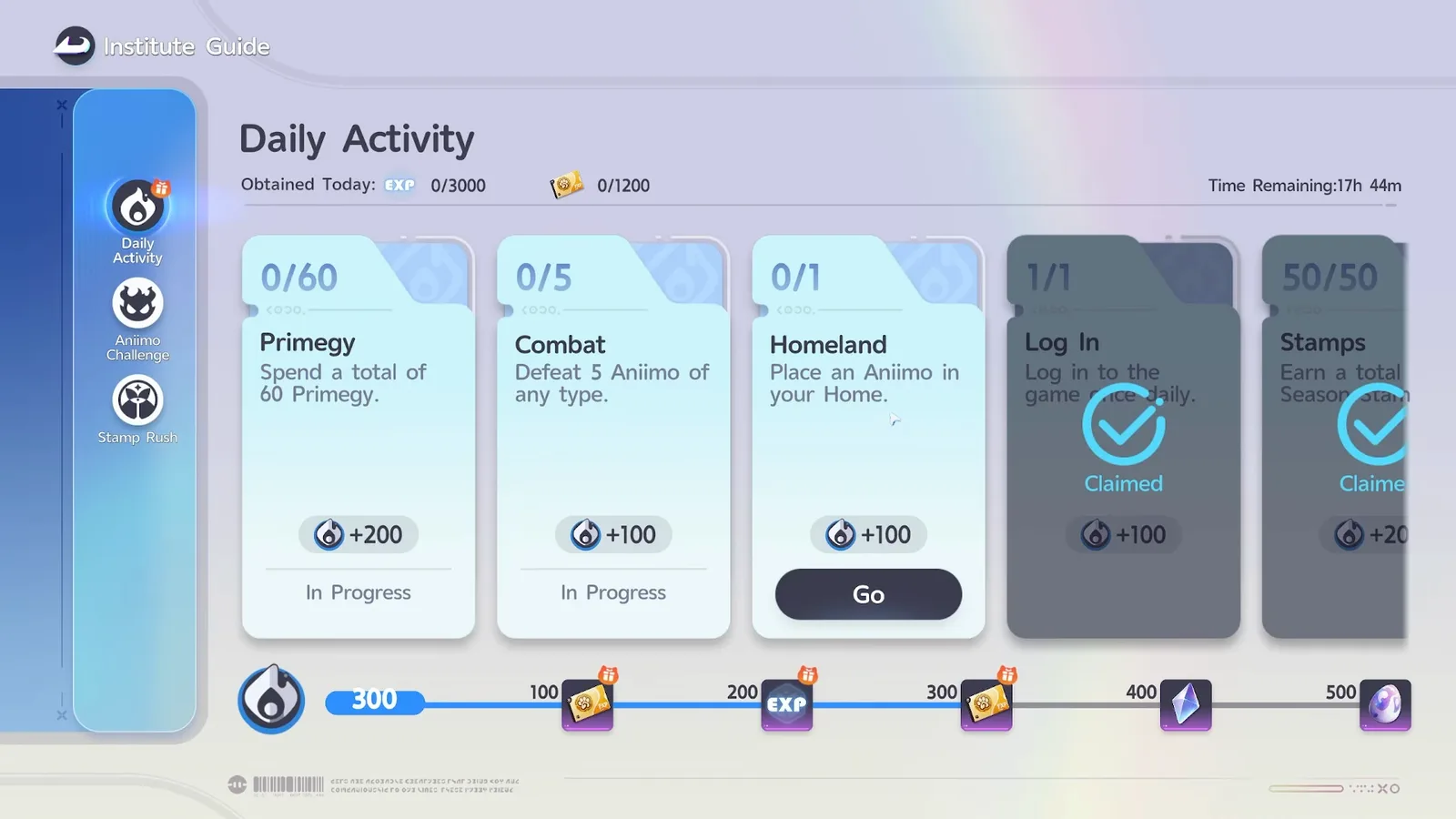
Two further ceilings sit at the top of the same screen, and they are easy to miss. The header reads Obtained Today against 0/3000 EXP and 0/1200 Credits, so the tab caps what it will pay out as well as what it will score. The countdown beside them read 17h 44m, which is the same daily clock as everything else.
The score matters beyond its own reward track, which is the reason to hit it rather than drift near it. The Sparkelf collab’s best daily job asks for 300 Daily Activity points, and our Season 1 events guide covers the milestone chests at 100, 200, 300, 400 and 500.
Next to it sits Aniimo Challenge, which AniimoSync opens at 9:48 with one warning attached at 10:03: it is energy gated. The four categories are Alpha Challenges for evolution material, Resonance star-up material, held items and capability awakening materials, and their advice is to spend energy on the ones you have not cleared yet, because first clear rewards only pay once.
What is capped weekly, and why the cap is lower than it looks
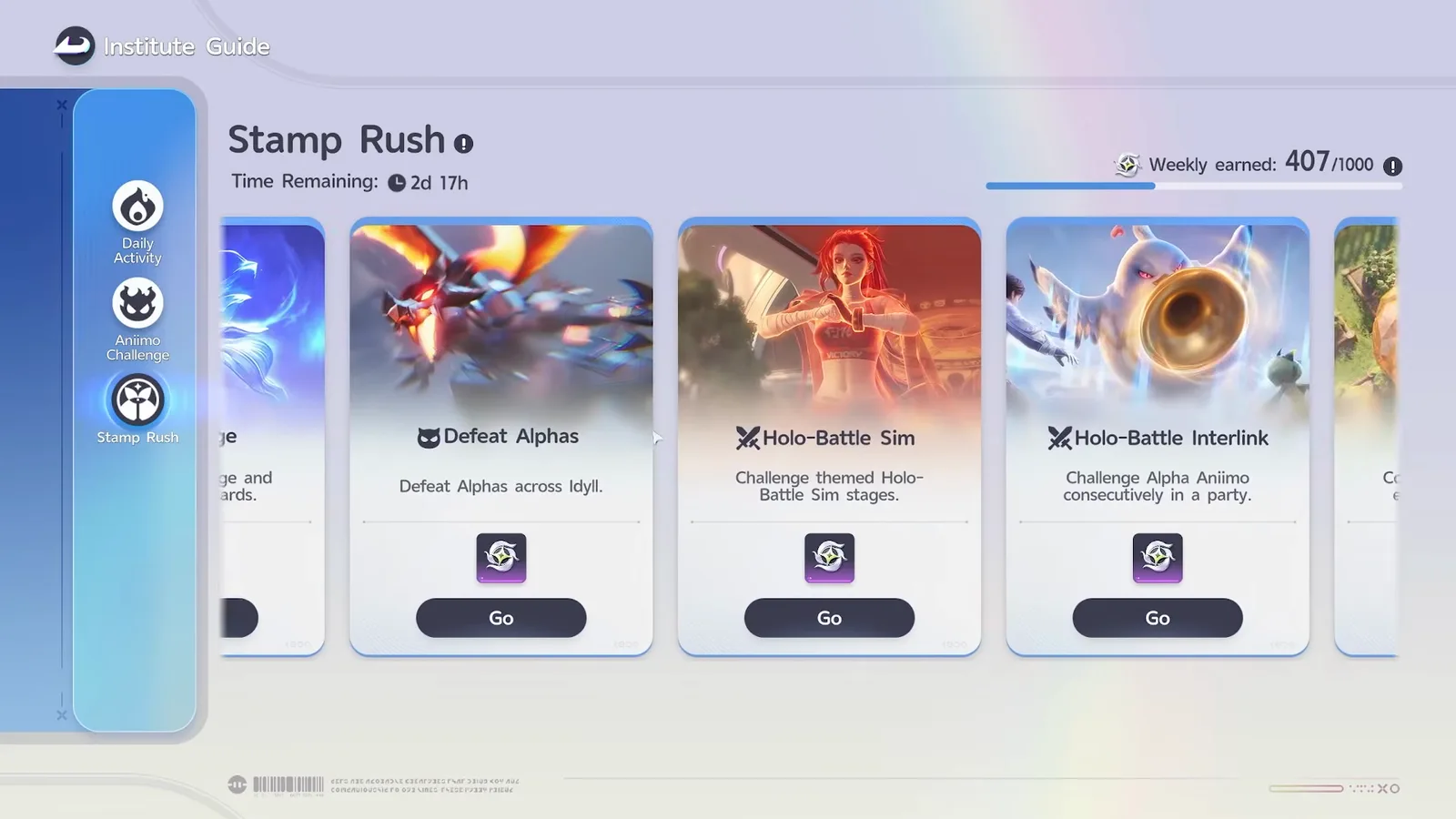
Stamp Rush is the weekly menu, and it is capped at 1,000 Season Stamps a week across every source combined, resetting on Monday at 04:00. The per-source ceilings add up to far more than 1,000, which means the total is the real limit and the categories are just a choice of how to fill it.
AniimoSync gets to the practical conclusion at 10:32 without the table: pick the categories you enjoy, because there is a weekly cap either way. Their header read Weekly earned: 407/1000 with Time Remaining: 2d 17h on a Friday, which lands on the Monday reset. The data files give every source its own ceiling: 600 each for Operation: Egg Heist and Home Orders, 400 for Catch Report, 300 each for Defeat Alphas, Wild Surge and Holo-Battle Interlink, 200 for the Star-Crossed Tea Party and 180 for Holo-Battle Sim, plus one further 50 point ceiling we could not match to a name. However you add them up it is far more headroom than a 1,000 stamp wallet can hold, and not all of it was switched on at launch.
One wrinkle the screen does not show you. The client says this week’s total Stamp Rush limit includes last week’s remaining cap on top of this week’s base allowance, so 1,000 is the weekly allowance rather than a hard ceiling, and a quiet week is not entirely lost.
The rest of the weekly picture is covered in depth elsewhere and worth not duplicating here. Our Season 1 events guide has the full Stamp Rush source table, what the Stamp Shop sells on its weekly and season tabs, and how the blind boxes work. Our Homeland guide covers the Home Orders that feed one of the two 600 point sources.
The Mysterious Vendor and the account menus
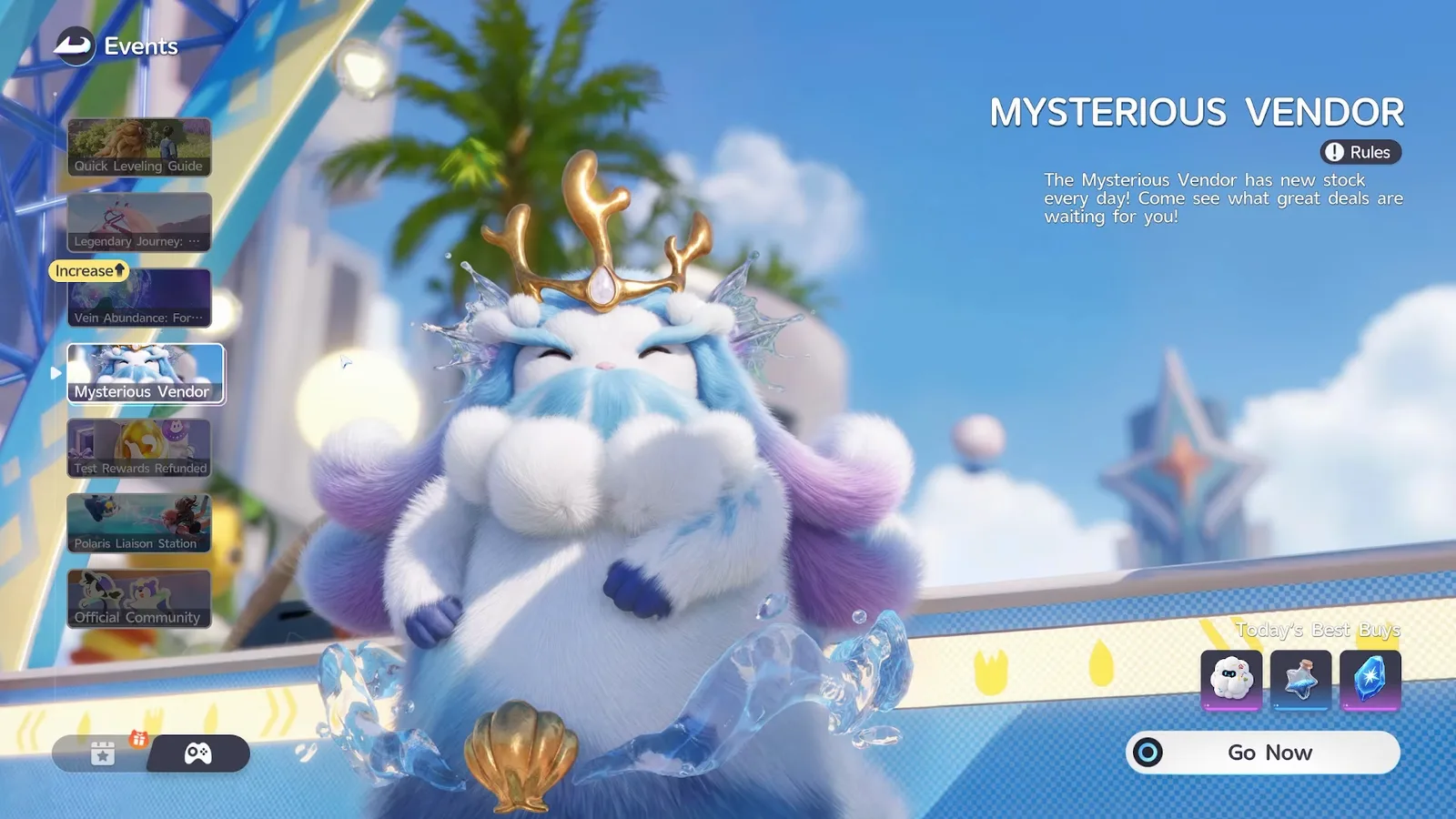
The Mysterious Vendor restocks daily at 04:00, and anything you buy is gone until the next restock. He stands near Horizon Square in Astra, where the client places him: a mysterious vendor hidden in plain sight near Horizon Square. Whether he is there every day is the one thing nobody can confirm, and AniimoSync hedges it themselves at 12:37.
AniimoSync’s take at 12:55 is that they would almost always buy something, because parts of the stock are harder to find than ordinary shop goods. Their Events panel for it reads The Mysterious Vendor has new stock every day! Come see what great deals are waiting for you! above a Today’s Best Buys row of three items and a Go Now button, and they name that day’s three at 12:50: tumblers, Star Dust and Vein Essence, priced in coins. The restock hour is the client’s own, printed in the vendor’s rules: The Mysterious Vendor restocks daily at 04:00 AM (UTC+8). Our Astra map has the exact pin.
One habit worth borrowing from the other daily shop rather than this one. The client’s Curio Corner Shop, which refreshes four items once a day, lets you lock an item on the shelf so it skips every later refresh, turning something you cannot afford today into a savings target. Nothing published says the Mysterious Vendor works the same way, so treat that as a Curio Corner feature until it is: our Season 1 events guide covers that shop and its Voxel Coin prices.
Three panels at the bottom of the Events list are account admin rather than gameplay, and they take about a minute between them.
- Test Rewards Refunded. Closed beta players only. AniimoSync calls it a deceiving screen at 13:20 because it shows for everyone, and reports that it was misbehaving on launch weekend for players who were entitled to it. Our beta rewards notice has the official claim route.
- Polaris Liaison Station. Binds your email and links your account. Worth doing on day one rather than the day you need it.
- Official Community. Free currency for following the official channels, and it claims itself when you open it.
While you are in the admin corner, our codes page is the other one minute job in the same category.
Five minutes a day, in order
If you only ever open three menus, open the Events tab for your check-ins, Daily Activity for the 500 points, and Elite Training to see whether a chapter is holding your cap. Everything else in this guide is optional or on a calendar you can catch later.
The order that wastes the least time, built from what the two sources agree on:
- Claim the check-ins. Set Out, Pathfinder! and Journey Handbook both count a total rather than a streak, so this is two clicks with no thinking attached.
- Read the Elite Training promotion panel. If it lists a level you have already passed, you have a chapter to finish and that is the day’s real job.
- Spend energy on an uncleared Aniimo Challenge. First clear rewards pay once, and the Primegy task is worth 200 Daily Activity points on its own.
- Top up to 500 Daily Activity points. The login and the stamp task usually finish it without a detour.
- Look at the vendor before the reset. Today’s Best Buys are gone at 04:00, and once bought they are out of stock until the next rotation.
AniimoSync says the sentence that should really sit above all of this at 6:45, halfway through the quest tabs: take it slow, you do not have to do everything at once. The menus look like a checklist and they are mostly a catalogue. Two of them have deadlines you can actually miss, and both are on our events calendar with their dates.
One gap worth stating plainly. The rotating event panels refresh on their own schedules and the client does not publish a single list of which panel uses which clock, so the countdown printed at the top of each panel remains the only authority. Anything below that timer is a reward preview, not a promise about tomorrow.
Sources
- AniimoSync · "ANIIMO BEGINNER Menu Guide | Events, Dailies, Weekly Caps & What Everything Does" (video)
- AniimoSync on YouTube
- The game’s own data files, build 1.0.0.7: the title and level cap tables, the Elite Training chapter tree and its required quest counts, the Path of Twining, Discovery, Victory and Splendor tabs, the eight Daily Activity tasks and their point values, the 500 point daily cap, the Stamp Rush weekly limits, and the Mysterious Vendor restock rules
- Official notice: Welcome to Idyll (daily check-in reset)
- Aniimo official event calendar