Beginner · 13 min
Aniimo “Your Current Device Does Not Meet the Minimum System Requirements”: Every Cause, in Order
The message a refused phone gets on launch night, taken apart. Pawprint’s own FAQ names the cause most spec-sheet comparisons miss: a GPU driver that does not expose Vulkan 1.1 blocks the install even on a phone that clears the chipset, the memory and the Android version. Eight causes, four of them quoted from the official notice, with the installer, the leftover beta client and the 18 GB of free space in the order that finds the cheapest answer first.

Written by
Sadeqe Mac
The error dialogue, the Play Store listing and the Android update screens on this page are frames from Sadeqe Mac’s walkthrough, filmed on 22 September 2026
“Your current device does not meet the minimum system requirements for the game.” On Android the usual cause is Vulkan 1.1 rather than the chipset: a phone can clear the Snapdragon 855 floor, the 6 GB of RAM and Android 10 and still be turned away, because the GPU driver it ships with does not expose the Vulkan 1.1 graphics interface. On iOS there is no equivalent trap and no workaround, because the floor is a hard one: an iPhone 11 (A13) on iOS 16.
That is not our reading of a specification sheet. It is the answer Pawprint Studio wrote itself, in the FAQ of the mobile pre-download notice published on 22 September 2026, and the second half of it is the part that never gets quoted: Check whether your phone supports Vulkan 1.1. Some older devices have GPUs that don’t support the Vulkan 1.1 graphics driver, which can block installation or stop you from entering the game.
Pre-download opened on 22 September 2026 and mobile goes live on 23 September, so this message is being read for the first time tonight, on phones no test build ever touched. Everything below is either quoted from that notice and the specification sheet inside it, dated 14 September 2026, or marked as ordinary phone behaviour we are inferring. We have not reproduced the error on a handset, and nothing here pretends we have.
What “your current device does not meet the minimum system requirements” means
It is the game refusing the phone, not the shop refusing the download, and the notice puts the same fault in two places at once.
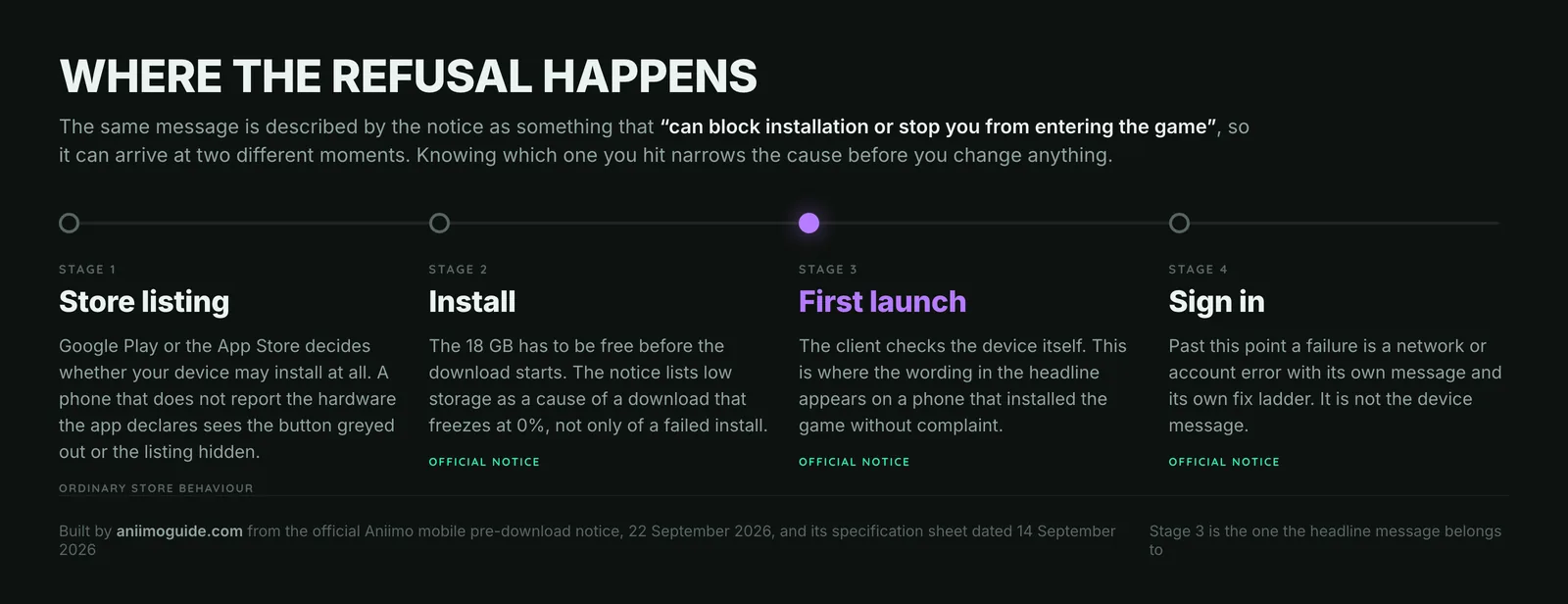
Knowing which stage you hit halves the work. If Google Play greys the install button out or hides the listing entirely, the store has read the hardware features the app declares, decided your phone does not report them, and stopped there: that is store behaviour, not an Aniimo message. If the install runs to the end and the game then refuses to open, the client has made its own check on the device. The sentence in the headline belongs to that second case, and it is the one the official FAQ was written to answer.
| Platform | Standing | What goes wrong |
|---|---|---|
| Android | Official FAQ | The GPU driver does not expose Vulkan 1.1. Can “block installation or stop you from entering the game”. |
| Android | Official FAQ | The installer came from outside the official stores. The first thing the FAQ tells you to check, ahead of any hardware question. |
| iOS and Android | Official FAQ | A client kept from an earlier closed test. Those builds “can no longer be used”: uninstall, then install the live client. |
| iOS and Android | Official notice | Less than 18 GB of free storage. Asked for before the download, and named as a cause of a download frozen at 0%. |
| Android | Spec sheet | Chipset under a Snapdragon 855 or Dimensity 1000. Under the published floor. |
| Android | Spec sheet | Under 6 GB of RAM, or Android older than 10. Under the published floor. |
| iOS | Spec sheet | iPhone older than the iPhone 11 (A13), or iOS under 16. Under the published floor, with nothing beneath it. |
| Android | Inferred | The app build, or Android itself, is several versions behind. Ordinary phone maintenance, not something Pawprint publishes. |
Read the standing column before the cause column. Three rows are quoted from a document Pawprint published on 22 September 2026, one more from the same notice, three are read off its specification sheet, and exactly one is ours. That separation is the whole point of a page like this: a launch night fills up with fixes nobody can source.
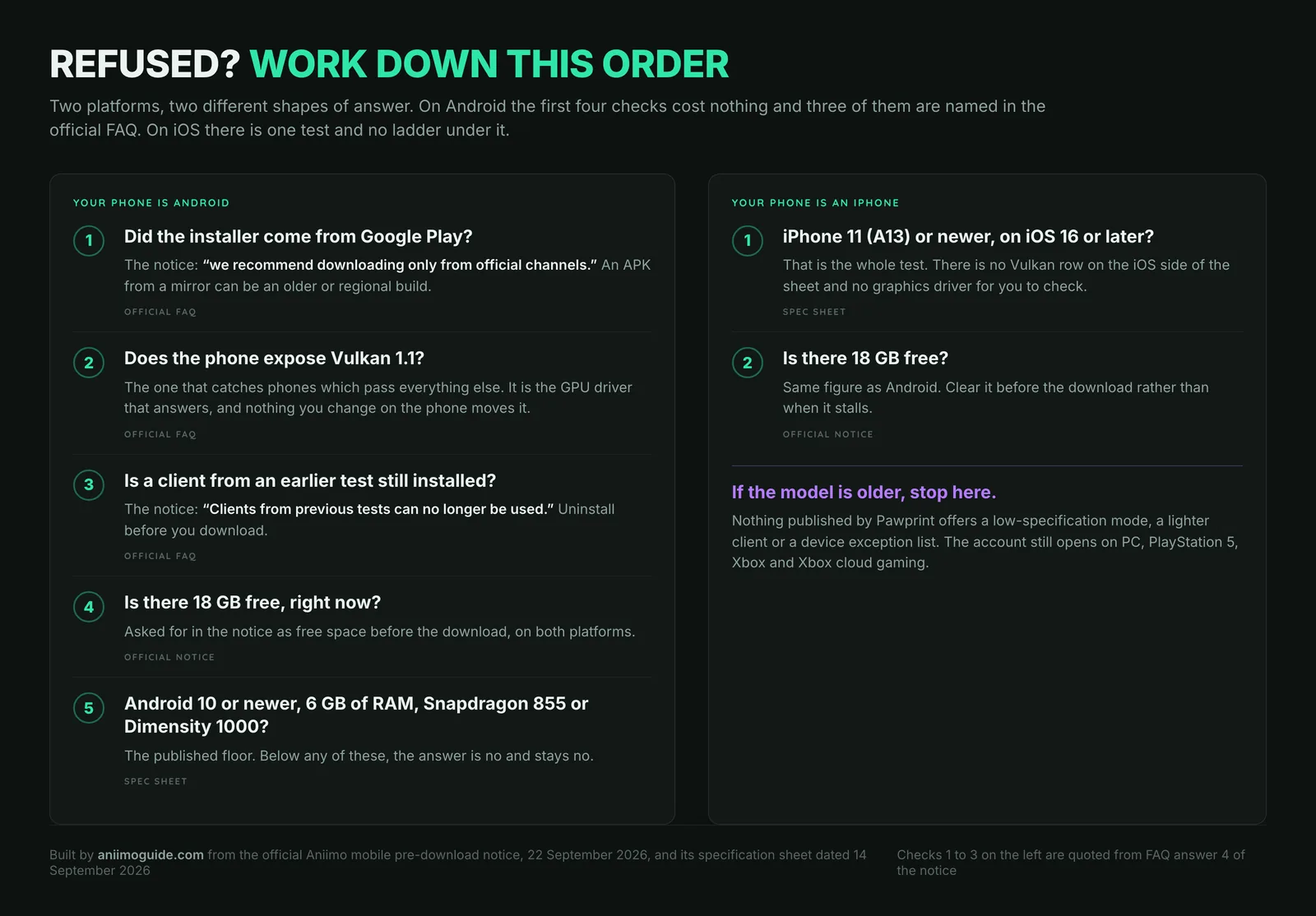
Take the free checks first. Where the file came from, whether the phone reports Vulkan 1.1, and whether an old test build is still installed can all be settled in a couple of minutes. Comparing part numbers is slower and, on Android, is the check most likely to tell you something you already knew.
Is my phone compatible with Aniimo? Check it against the sheet
Six things to read off your own handset, in the order that finds the cheapest answer first. What they are compared against is the sheet Pawprint published on 14 September 2026, carried in full, with the PC and console rows, on our Aniimo system requirements page.
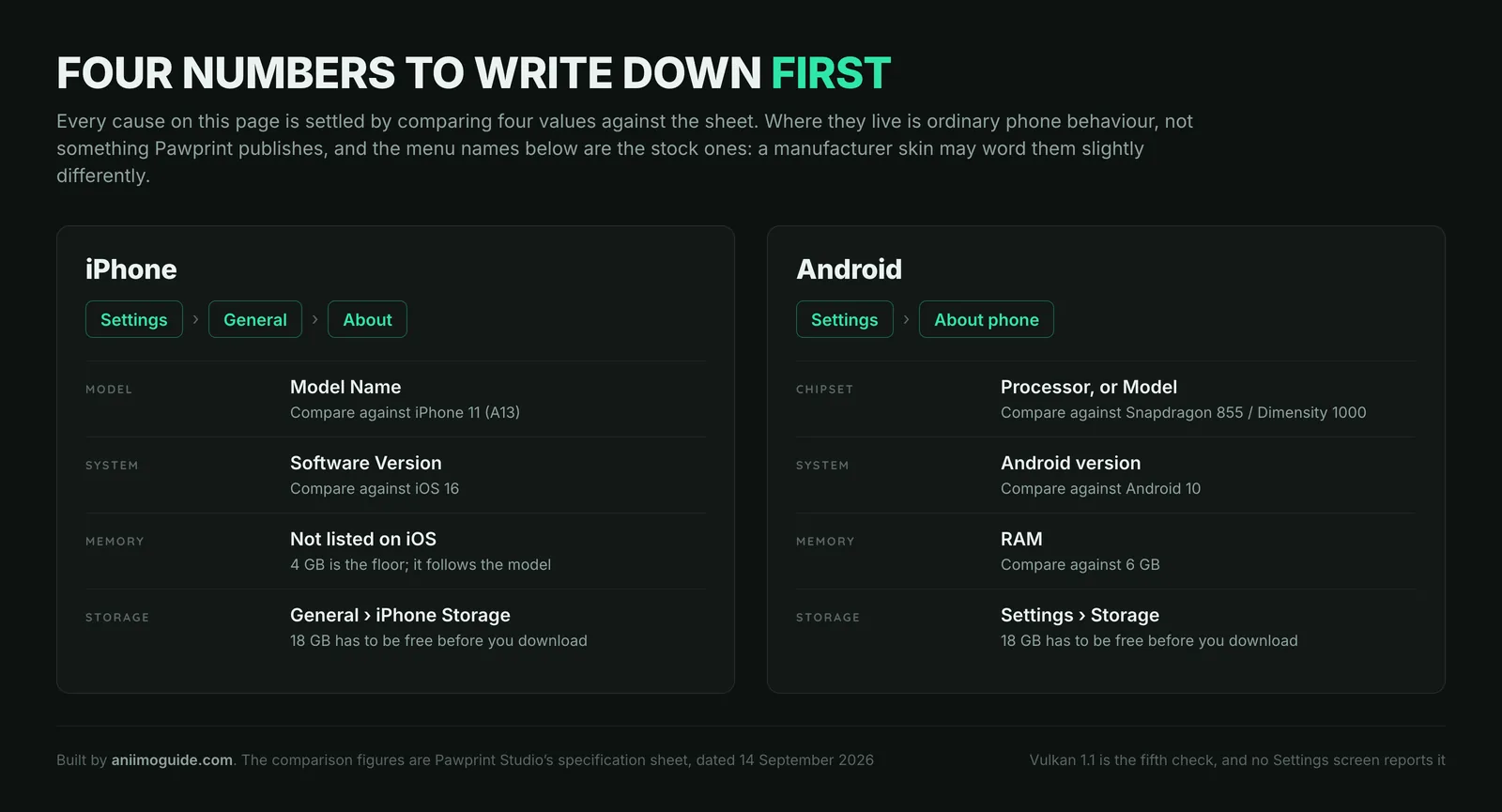
- Read your phone’s model and system version. iPhone: Settings, then General, then About. Android: Settings, then About phone. You want four numbers, the model or chipset, the system version, the RAM and the free storage.
- Compare those four against the floor. iPhone 11 (A13) on iOS 16 with 4 GB, or a Snapdragon 855 or Dimensity 1000 on Android 10 with 6 GB. One row under the floor is enough to be refused.
- On Android, check that the phone reports Vulkan 1.1. The FAQ puts this second for a reason. It is the GPU driver that answers, and a phone can pass everything else and still fail here.
- Uninstall any client kept from an earlier test. Delete the app, not its cache. The notice says those builds can no longer be used.
- Clear 18 GB before the download, not during it. The same figure covers iOS and Android, and low storage is listed as a cause of a download stuck at 0%.
- Install only from Google Play or the App Store. Package com.x.aniimos and App Store app id 6759098797, both published by Pawprint Studio, are the two listings the notice itself links.
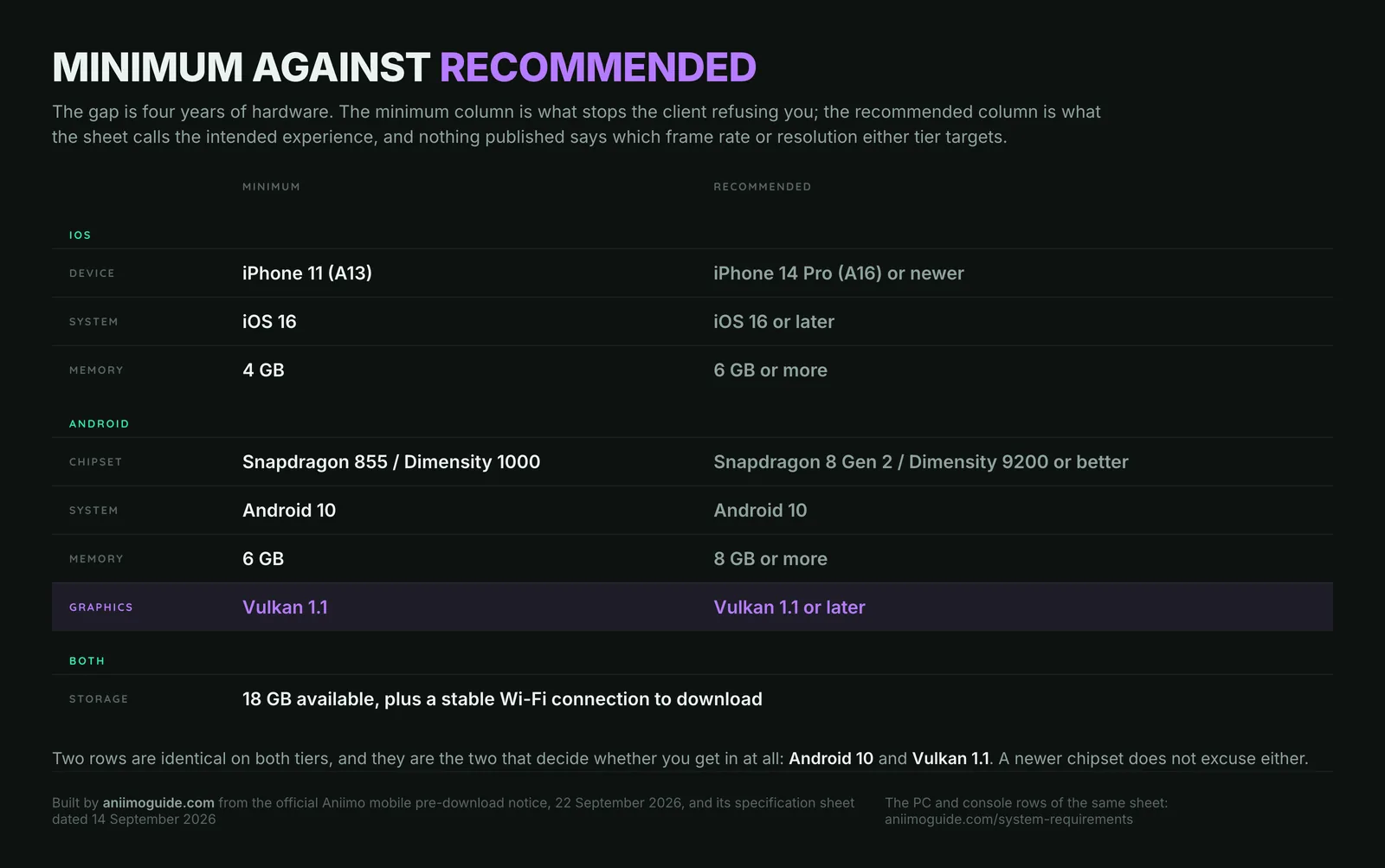
Three readings are worth having before you start comparing. The iOS floor is an iPhone 11, a 2019 handset, so the model is rarely the problem: the row that catches people is iOS 16, because a phone parked on iOS 15 clears the hardware and fails the sheet. On Android the named floor is a Snapdragon 855 or a Dimensity 1000, both 2019 parts, while the recommended tier is a Snapdragon 8 Gen 2, a 2023 flagship: four years of hardware between the two columns, and the sheet never says what either tier targets in frames or resolution. And the 6 GB of RAM is the row that rules out cheap current phones rather than old expensive ones.
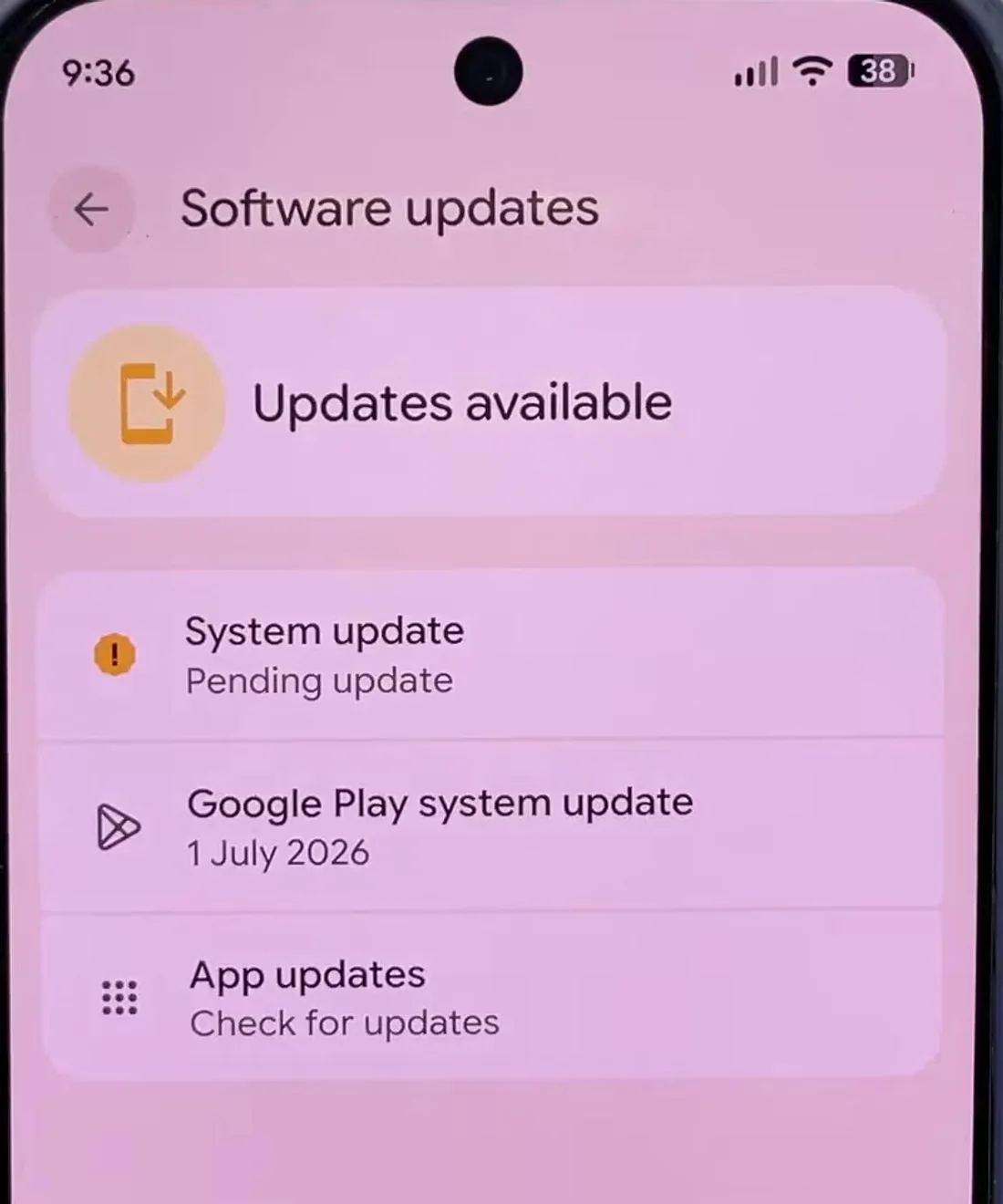
Two checks that the notice never mentions come from Sadeqe Mac, whose 22 September 2026 walkthrough of the mobile requirements adds updating Android itself under Settings, then System, then Software updates before you blame the hardware, and re-downloading the latest version of the app from the Play Store rather than trusting whatever build is already on the phone. Both are ordinary phone maintenance rather than anything Pawprint has published, and neither will move a device that is genuinely under the floor.
Aniimo and Vulkan 1.1: the Android check that ignores your chipset
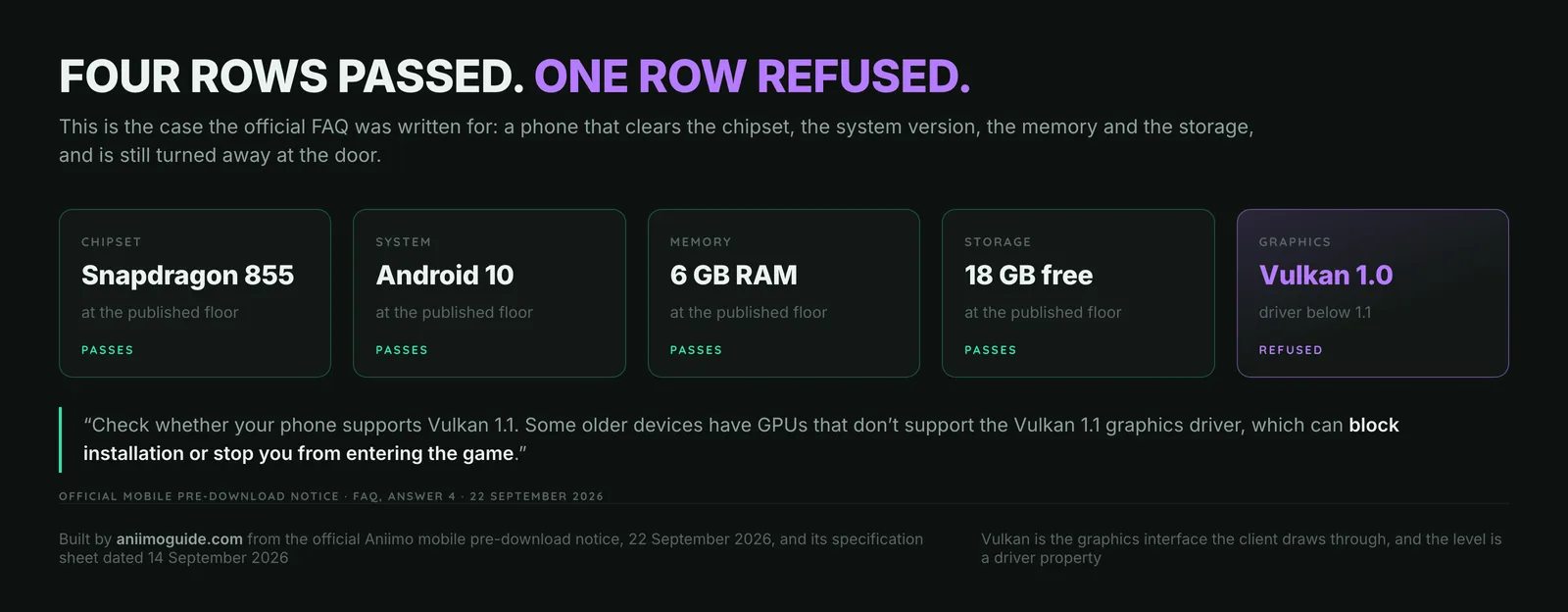
Vulkan is the graphics interface the client draws through, and 1.1 is the version of it Aniimo asks for. The level a phone reports is a property of the GPU driver the manufacturer shipped and then stopped updating, which is why it does not follow the chipset name as neatly as a comparison table suggests. That last part is ordinary Android behaviour rather than anything in the notice, but it is what turns the FAQ answer into a real warning instead of a formality: the sheet asks for Vulkan 1.1 in both the minimum and the recommended columns, so a newer processor does not excuse it.
How do you check it? Pawprint publishes no method, and we are not going to invent one. What follows from the sheet is the floor it names, a Snapdragon 855 or a Dimensity 1000. Beyond that, the ordinary routes are a device-information app that reports the Vulkan API level, and Google Play itself, which filters listings by the graphics features a device reports. Both are inferred. And if the answer comes back below 1.1, there is nothing to change: it is the driver, and no setting, no cleared cache and no reinstall moves it.
You installed Aniimo from outside Google Play or the App Store
This is the first line of the official answer, ahead of every hardware question, and on launch night it is a live problem rather than a formality.
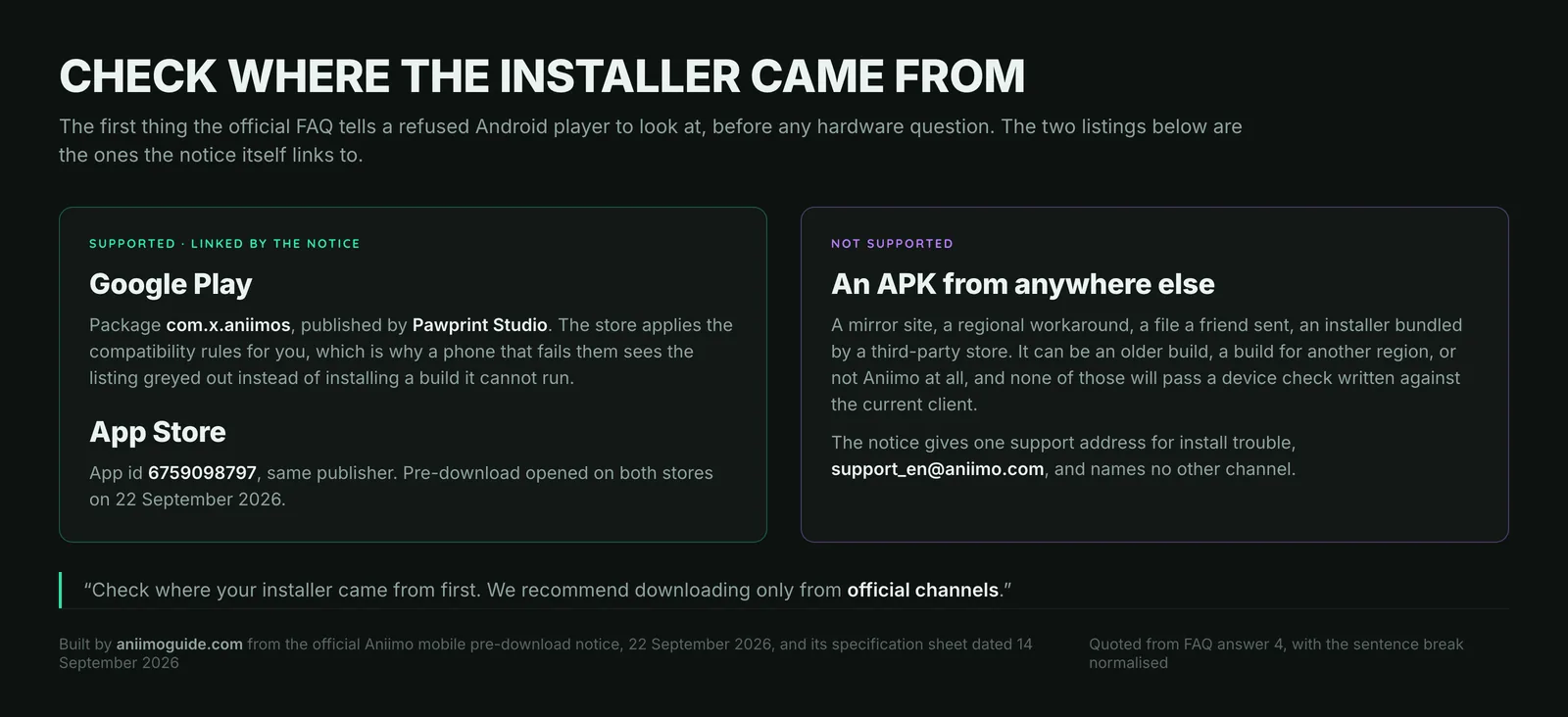
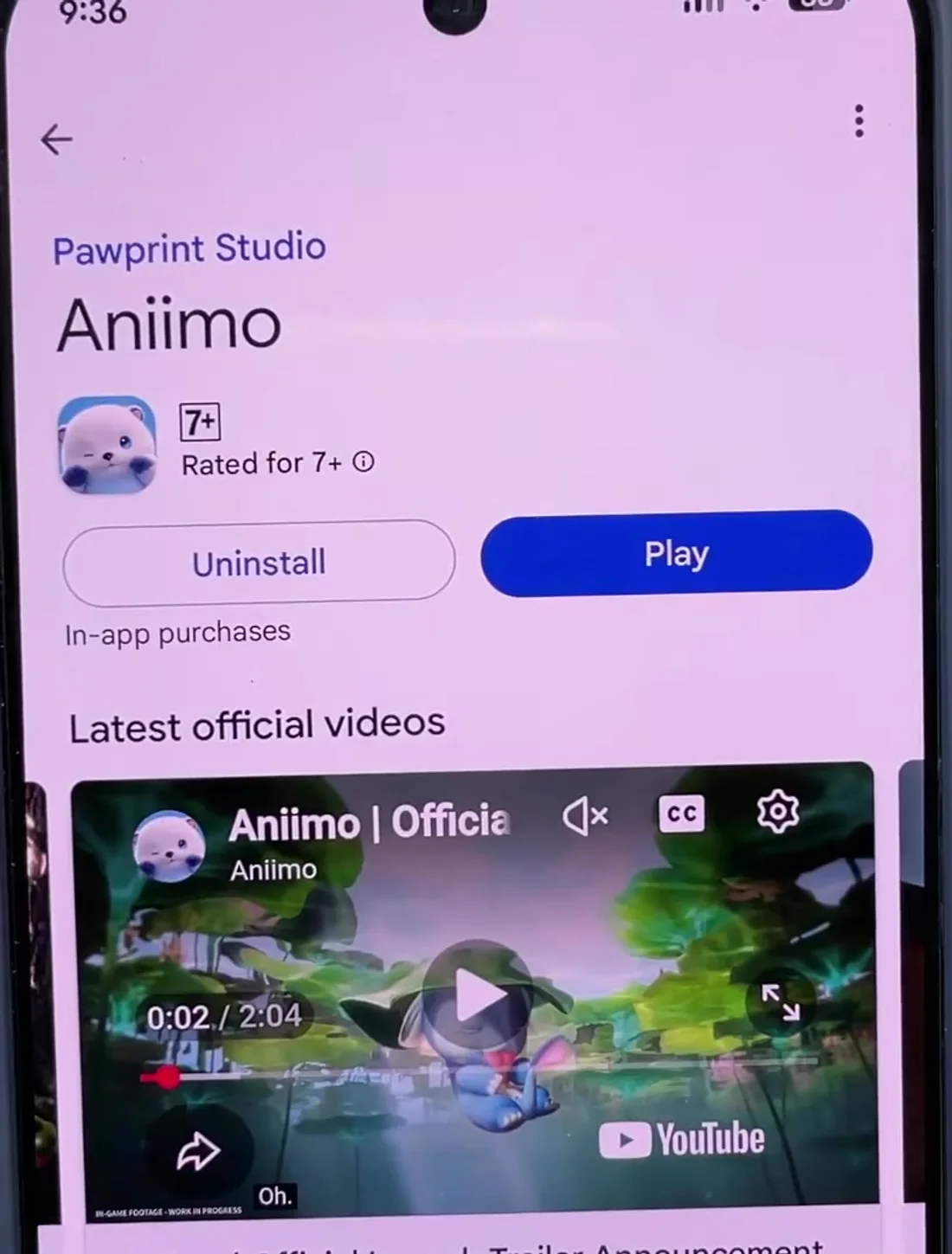
The notice’s words are we recommend downloading only from official channels, and the reason a mirror breaks the device check is mechanical rather than moral. An APK pulled from a file host can be an older build, a build cut for another region, or an installer that has been repackaged, and none of those is the client the current device check was written against. Installing through the store also means the store applies its compatibility rules for you: a phone that fails them sees a greyed-out button instead of a build it cannot run. If the install came from anywhere else, delete it and start again from com.x.aniimos on Google Play or app id 6759098797 on the App Store, both published by Pawprint Studio. The notice names one address for install trouble, [email protected], and no other channel.
A client left over from a closed beta test
The quietest cause on the list, because the old app carries the same name and the same icon as the one you are trying to install.
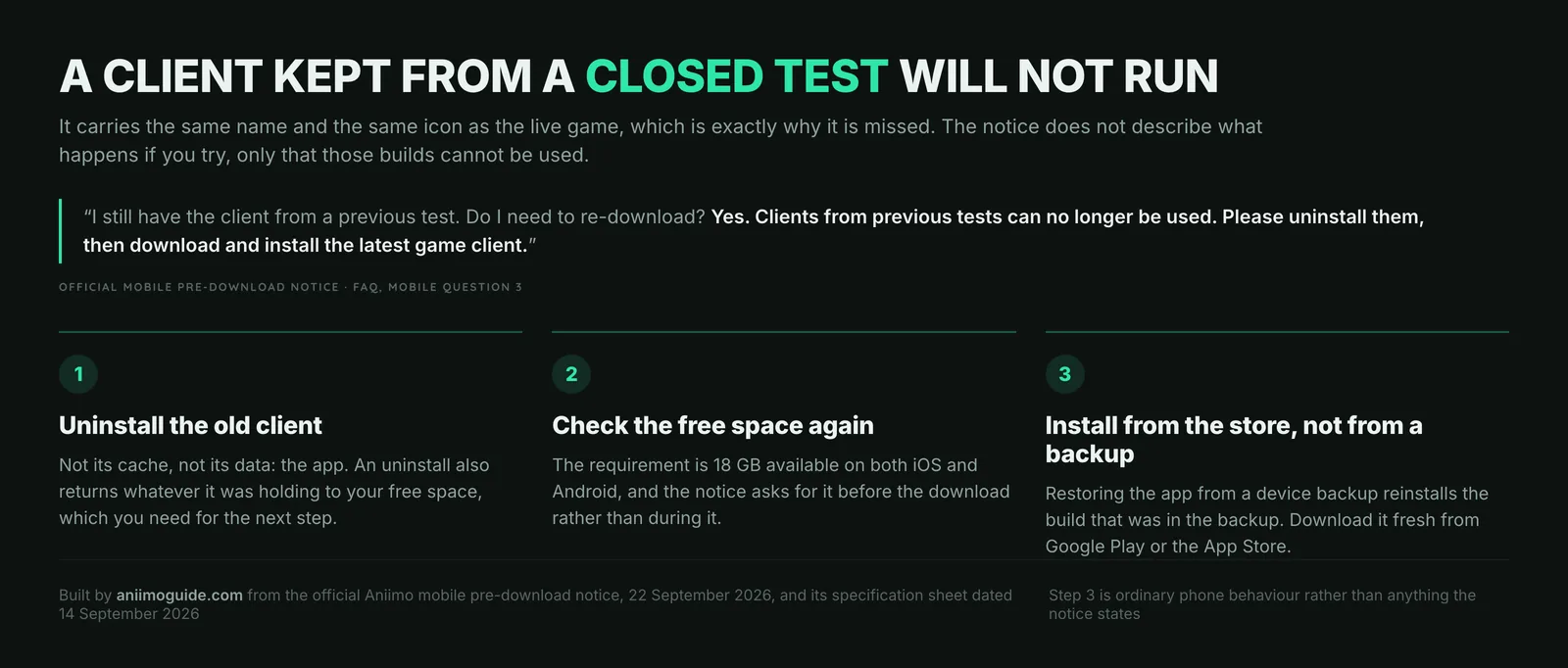
The wording leaves no room: Clients from previous tests can no longer be used. Please uninstall them, then download and install the latest game client. If you took part in the iOS technical test or either closed beta, that build is dead weight and it is holding storage you need for the 18 GB. Delete the app rather than clearing its data, because only an uninstall gives the space back. One trap that follows from how phones work rather than from the notice: restoring Aniimo from a device backup reinstalls whatever build the backup held, so download it fresh from the store instead. Nothing you did in a test is lost by deleting the client; the test rewards sit on the account, and the notice points them at a redemption page rather than at the app.
Not enough free space: Aniimo asks for 18 GB
The one number on this page you can act on immediately, and the one most likely to be the real answer on a phone that is otherwise fine.
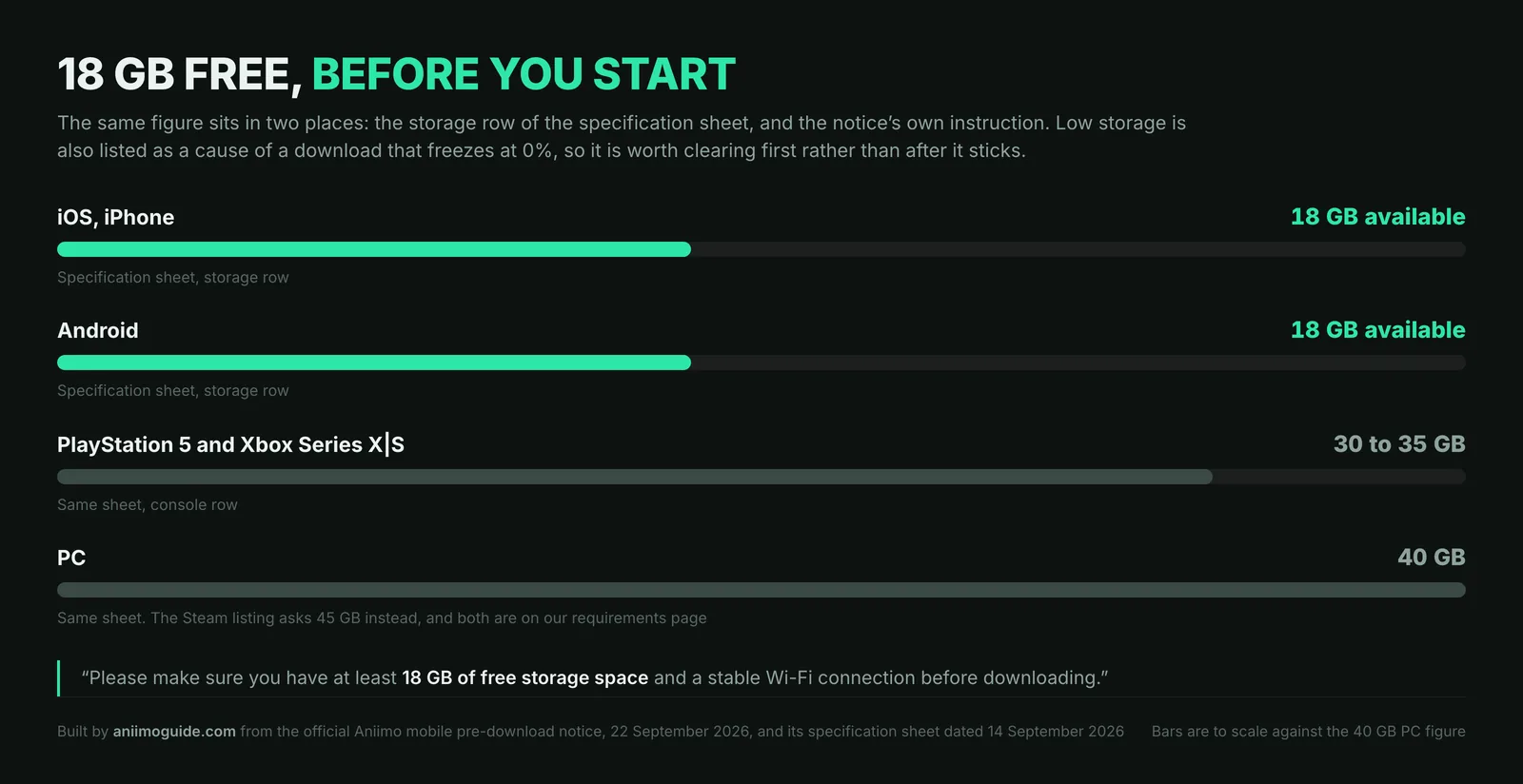
The notice asks for at least 18 GB of free storage space and a stable Wi-Fi connection before downloading, and the sheet lists 18 GB available for iOS and for Android alike. Note what that figure is and is not: it is the space to have free before you start, and Pawprint never publishes the size of the finished install, so do not assume the game will settle at 18 GB once it is on the phone. Clear it in the obvious places, Settings then General then iPhone Storage on iOS, Settings then Storage on Android, and clear it before the download rather than when it stops. The console and PC bars on the same card are there for the next section: if the phone is out, those are the sizes you are looking at instead, and the full sheet is on our system requirements page.
Aniimo download stuck, rolling back or frozen at 0%
A different failure with a different fix, and the notice ships its own ladder for it, ordered cheapest first.
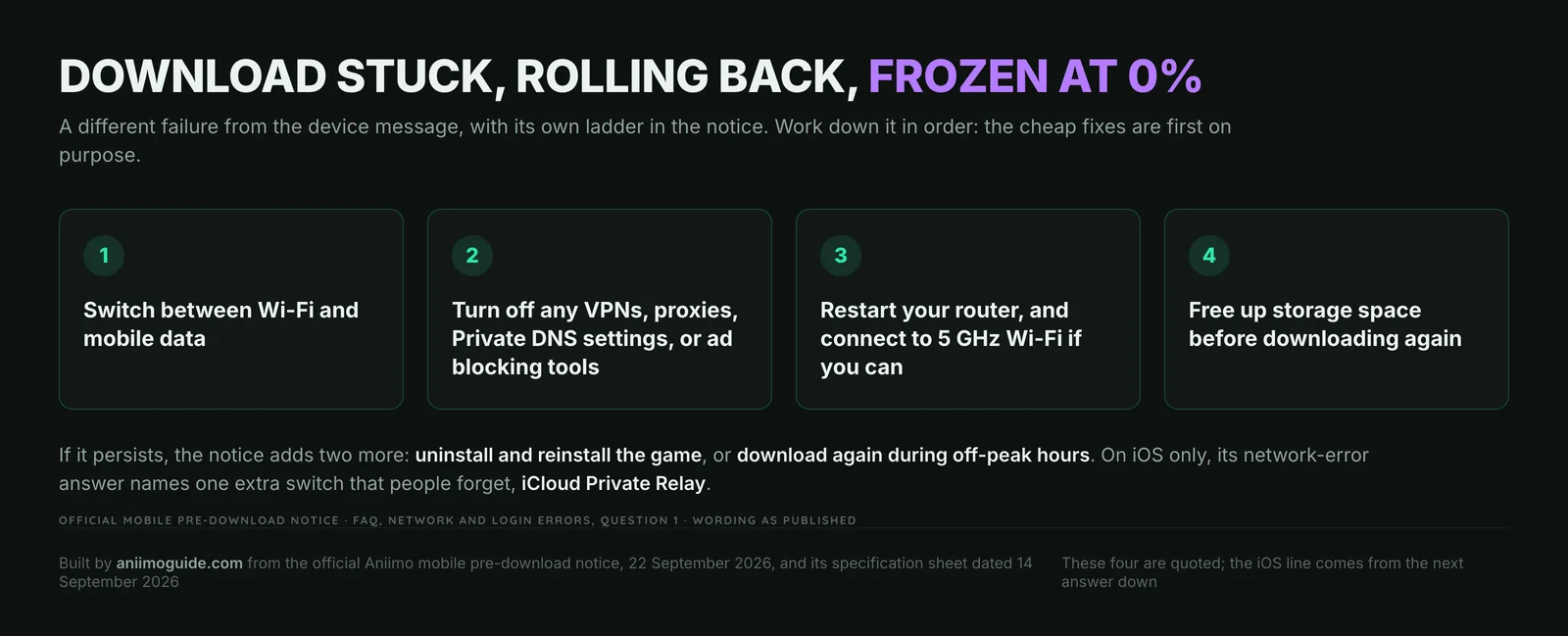
Two of the four are worth pulling out. Private DNS is the one people forget, because it is a system setting rather than an app, and an ad-blocking DNS profile counts as the ad blocking tools the notice names. And the fourth step, freeing storage, is the same 18 GB from the previous section: the notice lists low storage as a cause of a download that never moves off 0%, not only of a failed install. If the ladder runs out, it offers two more, uninstalling and reinstalling, or downloading during off-peak hours, and on iOS its network-error answer adds iCloud Private Relay to the list of things to switch off. Keep the two failures apart in your head: a download that never starts is a network problem, while a download that finishes and then refuses to launch is the device check. The full text of both ladders is in our notice archive.
If the phone is genuinely under the floor: where you can still play
Sometimes the honest answer is that the handset is out, and no setting changes it. That is worth saying plainly, because the account is not out with it.
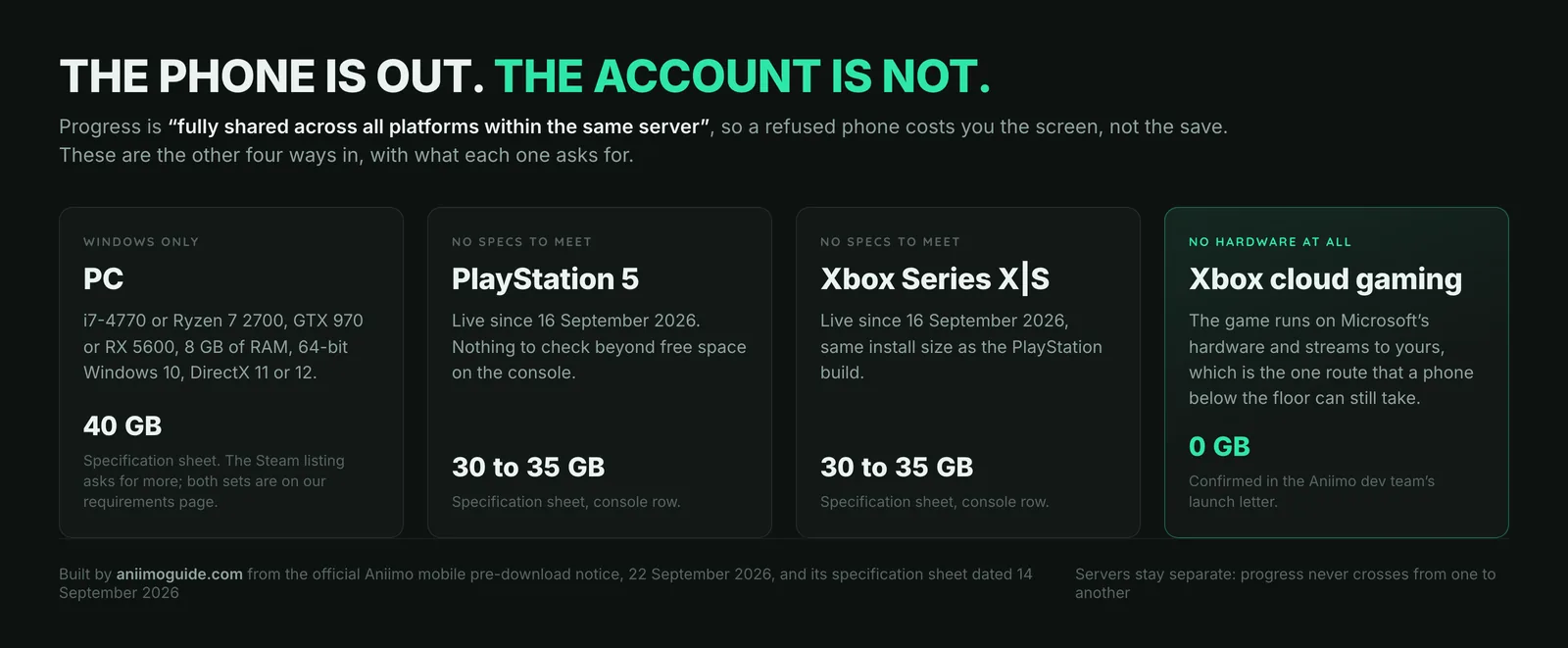
| Where | Storage | What it asks of your hardware |
|---|---|---|
| PC, Windows 10 64-bit | 40 GB | An i7-4770 or Ryzen 7 2700, a GTX 970 or RX 5600, 8 GB of RAM and DirectX 11 or 12. Specification sheet, 14 September 2026. |
| PlayStation 5 | 30 to 35 GB | Nothing to check beyond the free space. Same sheet. |
| Xbox Series X|S | 30 to 35 GB | Nothing to check beyond the free space. Same sheet. |
| Xbox cloud gaming | None | No hardware requirement at all, confirmed in the Aniimo dev letter. |
One warning on the PC row, because it is the one people act on. Those figures are Pawprint’s own sheet; the Steam listing asks for more, a GTX 1060, an i7-9700 or Ryzen 5 3600X, 12 GB of RAM and 45 GB. Both are official, published two weeks apart, and we will not pretend one replaced the other: both sit side by side on our requirements page with their check dates. Clear the higher number if you have the room.
A refused phone costs you the screen, not the save. The notice: Data on different servers is independent. Game progress is fully shared across all platforms within the same server. Your squad, your Homeland and your Aniilog open on any platform on that server, the mechanic we set out in the cross-progression guide and the account-linking Q&A. Link the email address at the first prompt, whichever device you get in on: the notice warns that skipping it may lose progress and launch rewards tied to other accounts.
Two things we will not guess at. Pawprint publishes no list of blocked devices and no chipset-by-chipset Vulkan table, so nobody can answer for a named handset. And the sheet carries its own escape clause, that the specifications may change as compatibility improves: a phone refused on 23 September 2026 is not refused for ever, but nothing dates that change. If you are getting in on another platform tonight, our launch coverage, the first ten things to do, the starter choice, the beginner guide and the daily checklist are written for the opening evening.
Sources
- Official notice: “Aniimo Mobile Pre-Download Now Available! Coming to All Platforms on September 23!” (22 September 2026), for the incompatible-device FAQ answer, the Vulkan 1.1 wording, the previous-test client answer, the 18 GB requirement, the download and network ladders, and the specification sheet dated 14 September 2026
- Aniimo system requirements: the full 14 September 2026 sheet alongside the Steam listing, for PC, mobile, console and Linux
- Sadeqe Mac, Aniimo mobile device requirements walkthrough (22 September 2026), for the Android software-update and Play Store re-download checks that the official notice does not mention
- A Letter from the Aniimo Dev Team, for Xbox cloud gaming as a platform with no hardware requirement